
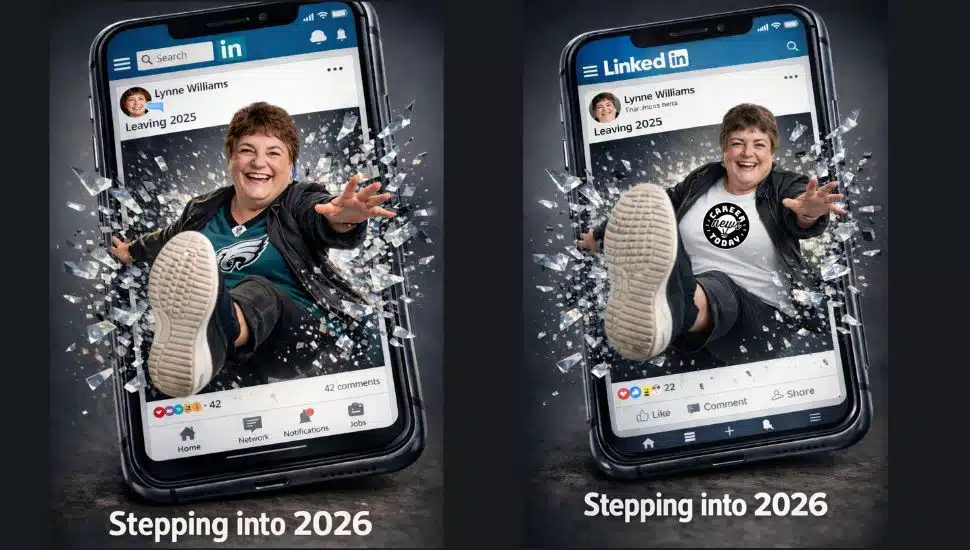

I was intrigued when I saw a couple of LinkedIn fun posts with AI-generated visuals for Stepping into 2026, so of course, I had to try it myself. I wanted to share it with you, so that you could try it too.
It was trial and error with Claude, Perplexity, Canva, DALL-E, and Image Generator, but I got the best results from ChatGPT. Mind you, I am using the paid $20/month 5.2 ChatGPT version.
Here are the Linkie connections I got the inspo from and their prompts, which I tweaked to suit me and what I wanted to wear.
WENDY SHORE’s PROMPT IN HER POST
A hyper-realistic, cinematic 3D image shows a smartphone tilted slightly back, filling most of the frame. The screen displays a LinkedIn-style post interface with the LinkedIn “in” logo at the top, a search bar, and a post from Lynne Williams. Her circular profile photo appears at the upper left, and the post headline reads “Leaving 2025.”
Inside the post’s image area, Lynne is shown in full 3D—bursting forward out of the screen as if she’s breaking through glass. Shards of glass and pixel-like fragments fly outward around her, especially near the right side and along the edges of the “broken” screen area.
Lynne is smiling broadly and looking toward the viewer. Her outfit is a Philadelphia Eagles Jersey with an open black jacket on top, black pants, and black Kizik sneakers. One leg is extended toward the viewer in dramatic perspective, with the white sole of her sneakers prominently visible.
Below the post image, the interface shows 226 reaction icons (including heart, clap, and thumbs up) with 42 comments. Along the bottom of the phone screen are LinkedIn-style navigation icons (Home, Network, Post, Notifications, Jobs).
At the very bottom of the overall image outside the phone large, bold text reads: “Stepping into 2026.” The lighting matches a studio-style portrait feel, with a crisp, high-contrast, energetic “breakthrough” effect.
CHER JONES’ PROMPT IN HER POST
Keep the exact facial structure, identity, and key features of the person in the input image. Create a hyper-realistic 3D scene where I am breaking out of a LinkedIn mobile timeline feet first. Rebuild the LinkedIn interface from scratch. Include the LinkedIn logo at the top, the profile picture, my username is Lynne Williams Leaving 2025” post frame, reactions row, and the Like Comment Share bar. Include the bottom LinkedIn navigation icons. Place me inside the post image area, then reposition my body so it looks like I am climbing out of the phone and stepping forward out of the timeline. Make one foot extend toward the viewer in full 3D. Add glass shards or pixel fragments around the point where I break through. Lighting should match my original photo. Keep the final image bold and cinematic. I should be wearing black pants, a white shirt with an open black jacket, and black Kizik sneakers with white soles. Make it say stepping into 2026 at the bottom of the picture visual.
IT’S A WRAP
First, I had asked ChatGPT to include my Career News Today logo on my shirt, and I provided the image. ChatGPT couldn’t spell CAREER correctly after a couple of attempts, even though I included the logo, so I asked for a white shirt, then manually placed the logo on it.
Happy New Year to all! GO LINKEDIN and GO BIRDS!
Did you read last week’s article? What Are Your Plans to Update Your LinkedIn Profile in 2026?
NEXT STEPS
- Subscribe to my newsletter on LinkedIn™ for bright ideas on managing your career.
- Subscribe to the Great Careers Network Substack
- If you need a resume or LinkedIn™ profile to get you to your next step, book a call to chat!
- Join as a member at https://greatcareers.org/membership
UPCOMING EVENTS
Join us for monthly events at our Nonprofit Events Quick List Page and stay tuned for the launch of our new website! You will be able to register after we launch.
- More to come for January 2026!
- Mon Jan 5 – Beating the Applicant Tracking System Black Hole
- Wed Jan 7 – Harnessing AI for Smarter Job Searches
- Thu Jan 8 – Job Scams 2026: How to Spot, Avoid, & Report Them
- Thu Jan 8 – Virtual Jobseeker Support Group
- Mon Jan 12 – Career Success Group Job Seeker Accountability & Networking
- Mon Jan 12 – How to Create Snazzy Graphics for Social Media Step-by-Step Demo
- Mon Jan 12 – Tips to Build Your LinkedIn Brand
- Thu Jan 15 – Recruiter on Call with Jobs
- Mon Jan 19 – MLK Day Job Fair at Temple University
- Tues Jan 20 – Skills for Career Transition
- Tue Jan 20 – Business Executives Networking Group & ChemPharma LV Chapter
- Wed Jan 21 – What are small business employers looking for? Small Biz vs. Corporate Employers
- Thu Jan 22 – Career Success Group Job Seeker Accountability & Networking
- Tues Jan 27 – Business Executives Networking Group & ChemPharma
- Wed Jan 28 – How to Develop Successful Job Search Strategies
- Sat Jan 31 – The Launchpad Role: How to Choose Your Next Job to Unlock the One After